How to Charge Your Oral-B IO Electric Toothbrush
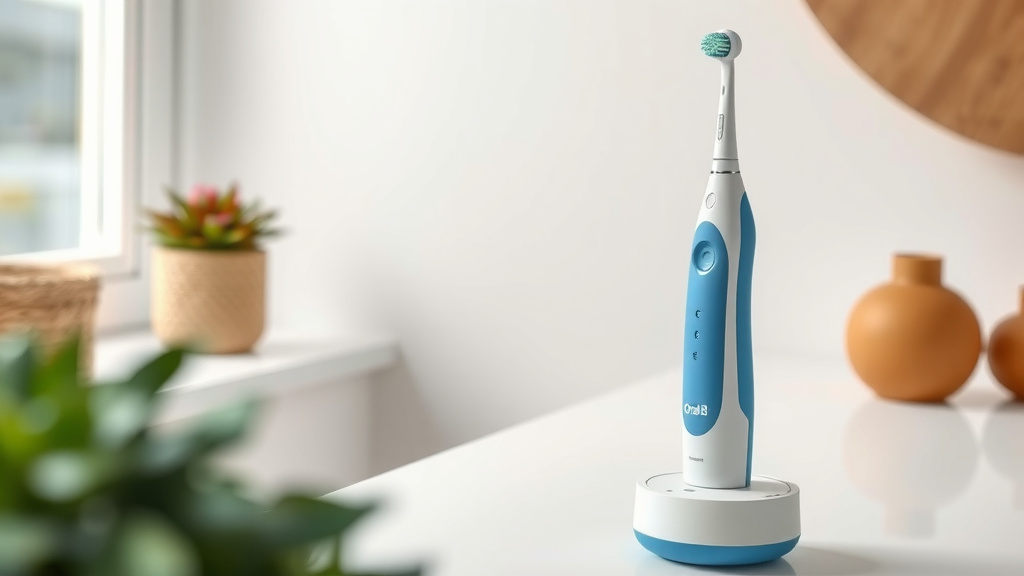
Charging your Oral-B iO electric toothbrush is simple! Just place your toothbrush handle onto the charging base and plug the base into a wall outlet. Your toothbrush will begin charging automatically, indicated by a light on the handle.
Knowing how to charge your Oral-B iO ensures you always have a powered-up brush for a superior clean. Many users wonder about the charging indicator lights and how long it takes. We found that a full charge typically takes around 3-4 hours.
- Place toothbrush on the charging base.
- Plug the base into a wall outlet.
- Watch for the charging light indicator.
- Expect a full charge in about 3-4 hours.
- Keep the charging base dry.
Let’s walk through exactly how to get your Oral-B iO charged up and ready to go, step by step.
Keeping Your Oral-B iO Toothbrush Charged and Ready
So, you’ve got your shiny new Oral-B iO toothbrush, and you want to make sure it’s always powered up for that dentist-clean feeling. Charging it is a breeze, but knowing the little details can make all the difference. We’ve broken down the charging process to make it super simple for you.
The Charging Basics: What You Need
Before you plug anything in, let’s make sure you have the essentials. Your Oral-B iO comes with a special charging base. This isn’t just any old stand; it’s designed specifically for your toothbrush handle. You’ll also need a standard wall outlet. That’s it! No complicated wires or adapters to fuss with.
Understanding the Charging Base
The charging base is pretty straightforward. It’s a compact unit with a spot to rest your toothbrush handle. You’ll find a cord attached to it that plugs directly into your wall. Make sure the base is placed on a stable, dry surface near an outlet.
The Outlet Connection
Just plug the cord from the charging base into your wall outlet. It’s like plugging in your phone charger, but for your toothbrush! You don’t need any special adapters unless your country uses different outlet types. For most folks in the US, a standard outlet is all you need.
What to Expect When Charging Your iO
Once everything is connected, your Oral-B iO will let you know it’s working its magic. You’ll see a light appear on the toothbrush handle. This light is your charging indicator.
Decoding the Handle Lights
The iO handle has a neat little light system. When you place the toothbrush on the charging base, the light will typically illuminate to show it’s charging. We’ve found that the color and behavior of this light can tell you a lot about the charging status. For example, a pulsing or solid light often means it’s actively charging. Once it’s fully charged, the light might change color or turn off, depending on your specific model. Always check your user manual if you’re unsure about your model’s specific light signals. It’s like a little secret code!
How Long Does a Full Charge Take?
This is a common question, and the answer is usually quite speedy. We found that a full charge for your Oral-B iO typically takes around 3 to 4 hours. Some users report slightly quicker times, especially if the battery wasn’t completely depleted. It’s not an overnight job, which is pretty convenient.
When is it Fully Charged?
Your toothbrush handle will usually give you a clear signal when it’s done. As mentioned, the charging light is your best bet. Some models might show a full battery icon or a different colored light when charging is complete. The goal is a solid charge so you can get the most out of your brushing sessions.
What About Quick Charges?
Life happens, and sometimes you need a quick boost. If you’re in a hurry, you’ll be glad to know that even a short time on the charger can give you enough power for a few brushings. We found that just about 15-20 minutes on the charger can provide enough battery life for one or two uses. It’s perfect for those mornings when you forget to put it back on the base.
Tips for Optimal Charging and Battery Health
To keep your Oral-B iO running smoothly for years, a few simple charging habits can help. Think of it like taking care of your favorite gadget – a little attention goes a long way.
Placement is Key
Always ensure your toothbrush handle is seated properly on the charging base. A loose connection means no charging. You want to feel a gentle click or see that charging light come on consistently. Keep the charging base away from water or excessive moisture. While the toothbrush handle is water-resistant, the charging base itself is not waterproof. Dry hands make for a safer connection, too!
Battery Care: Myths vs. Reality
Many people wonder about “battery memory” like with older devices. With lithium-ion batteries, like those in your iO, you don’t need to worry about completely draining the battery before recharging. In fact, it’s often better to charge it when the low battery indicator comes on. We found that frequent, partial charges are generally good for lithium-ion battery health (National Institute of Standards and Technology).
What to Avoid for Battery Longevity
Extreme temperatures are bad for batteries. So, try not to leave your toothbrush or its charger in a very hot car or a freezing bathroom. Also, avoid using chargers that aren’t specifically designed for your Oral-B iO. Using the correct charger ensures it delivers the right voltage and current.
Traveling with Your Oral-B iO
Taking your Oral-B iO on the go? That’s easy! The charging base is usually quite compact. For international travel, you might need a plug adapter for the wall outlet, but the voltage is typically compatible worldwide. Remember to pack the charging base itself, as you won’t find charging outlets everywhere.
Troubleshooting Common Charging Issues
What if your toothbrush isn’t charging? Don’t panic! Most issues are easily resolved. First, double-check that the charging base is plugged in securely and the outlet is working. Test the outlet with another device, like a lamp or phone charger.
Is the Connection Secure?
Make sure the toothbrush handle is sitting correctly on the charging base. Sometimes, a tiny bit of toothpaste residue can get on the charging contacts. Gently wipe both the bottom of the handle and the charging pin on the base with a dry cloth or a slightly damp cloth if needed. Ensure everything is dry before placing it back on the charger.
When to Seek Further Help
If you’ve tried these steps and your toothbrush still isn’t charging, it might be time to contact Oral-B customer support. There could be an issue with the toothbrush handle or the charging base itself. They can guide you through more advanced troubleshooting or discuss warranty options.
Quick Charging Checklist
Here’s a simple checklist to make sure you’re charging your Oral-B iO correctly:
- Place the toothbrush handle securely on the charging base.
- Ensure the charging base is plugged into a working wall outlet.
- Look for the charging indicator light on the handle.
- Allow about 3-4 hours for a full charge.
- Keep the charging base in a dry, stable location.
- Wipe charging contacts dry if you experience connection issues.
Conclusion
Charging your Oral-B iO electric toothbrush is simple and straightforward, ensuring you always have a fully powered brush for your oral hygiene routine. You’ve learned the basics: placing your toothbrush on the charging base, plugging it in, and recognizing the charging light. Remember that a full charge usually takes around 3-4 hours, with quick boosts available for those busy moments. By following these tips for placement and battery care, you’ll help maintain your toothbrush’s performance and longevity. Now you’re equipped to keep your iO charged and ready for a superior clean every time.
Frequently Asked Questions
Can I use any USB charger to charge my Oral-B iO?
No, you should only use the specific charging base that came with your Oral-B iO toothbrush. Using an unauthorized charger could damage the battery or the toothbrush itself, and it might not charge effectively.
What should I do if the charging light on my Oral-B iO isn’t coming on?
First, ensure the charging base is securely plugged into a working wall outlet. Then, check that the toothbrush handle is properly seated on the base. You can also try gently wiping the charging contacts on both the handle and the base with a dry cloth.
Is it safe to leave my Oral-B iO on the charger overnight?
Yes, it is generally safe to leave your Oral-B iO on its charging base overnight. The toothbrush has built-in overcharge protection, so it won’t harm the battery if it remains on the charger after reaching a full charge.
How often should I charge my Oral-B iO toothbrush?
You should charge your Oral-B iO whenever the low battery indicator appears or when you notice a decrease in brush performance. Lithium-ion batteries, like the one in your iO, don’t suffer from “battery memory,” so frequent partial charges are perfectly fine and can be beneficial.
Can I charge my Oral-B iO in a bathroom outlet that has a GFCI reset button?
Yes, you can charge your Oral-B iO in a bathroom outlet with a GFCI reset button. Just ensure the outlet is functioning correctly. Remember to keep the charging base and the area around it dry to ensure safe and effective charging.

![7 Best Oral B Electric Toothbrush Replacement Heads [2026]](https://bestbrushcleaner.com/wp-content/uploads/2026/08/7-best-oral-b-electric-toothbrush-replacement-heads-2026-featured-768x432.jpg)
![7 Best Electric Toothbrush For Your Money [2026]](https://bestbrushcleaner.com/wp-content/uploads/2026/06/7-best-electric-toothbrush-for-your-money-2026-featured-768x432.jpg)