How to Replace Oral-B Electric Toothbrush Batteries
Putting batteries in your Oral-B electric toothbrush is quite simple. You’ll need to twist the handle counter-clockwise to remove the bottom cap. Then, insert two AA batteries according to the diagram inside. Finally, twist the cap back on until it clicks.
This process ensures your toothbrush has the power it needs for effective cleaning. Many Oral-B models use standard AA batteries. Knowing how to replace them will keep your brushing routine uninterrupted and your smile bright. We’ll cover any specific model variations too.
- Locate the battery compartment at the bottom.
- Twist the handle base counter-clockwise to open.
- Insert the correct type of batteries (usually AA).
- Ensure correct polarity (+/-) as shown.
- Twist the base back on until it locks securely.
Let’s walk through exactly how this works step by step, so you can get back to sparkling clean teeth in no time!
Replacing Batteries in Your Oral-B Electric Toothbrush
It’s a common situation: your trusty Oral-B electric toothbrush suddenly feels a bit sluggish, or worse, stops working altogether. Usually, this means it’s time to swap out the batteries. Don’t worry, it’s a straightforward process that doesn’t require any special tools. We’ll guide you through it so you can get back to that dentist-clean feeling.
Getting Started: What You’ll Need
Before you begin, make sure you have the right supplies. This will make the entire process much smoother and faster. You’ll be surprised how quickly you can get your toothbrush back in action.
The Right Batteries
Most Oral-B electric toothbrushes, especially the battery-powered models (not the rechargeable ones that plug into the wall), use two standard AA batteries. It’s always a good idea to double-check your toothbrush’s manual or look inside the battery compartment for confirmation, but AA is the most common size. We recommend using high-quality alkaline batteries for the best performance and longevity. This helps ensure your toothbrush has the power needed for effective cleaning.
A Clean Workspace
Find a clean, flat surface to work on. A kitchen counter or bathroom vanity is usually perfect. This helps prevent any small parts from getting lost and keeps your toothbrush clean during the battery change. Having a dry area is also key, as we’ll be dealing with battery contacts.
Opening Your Oral-B Toothbrush Handle
This is the part where you access the battery compartment. It’s designed to be simple and secure. Oral-B has made it easy for you to maintain your device.
Locating the Battery Compartment
The battery compartment is almost always located at the very bottom of the toothbrush handle. You’ll see a distinct section at the base, which is often a different color or texture than the rest of the handle. This is the cap you’ll need to remove.
The Twisting Mechanism
To open the compartment, you need to twist the bottom cap. The direction is crucial here. You’ll want to twist it counter-clockwise. Think of unscrewing a jar lid – it’s that kind of motion. You might feel a slight resistance at first, but it should turn relatively easily.
Some models might have a small arrow indicating the direction to turn for opening. If you see one, follow that guidance. For most, counter-clockwise is the universal “unlock” signal for this type of compartment.
What if it’s Stuck?
If the cap feels very stubborn, don’t force it too aggressively. Sometimes, a bit of a gentle wiggle while turning can help. You can also try gripping it with a dry dish towel for a little extra traction. In rare cases, a small amount of build-up might be the culprit. Ensure the area around the cap is clean before attempting to twist.
Inserting the New Batteries
Once the cap is off, you’ll see the battery chamber. This is where your new power sources go.
Understanding Battery Polarity
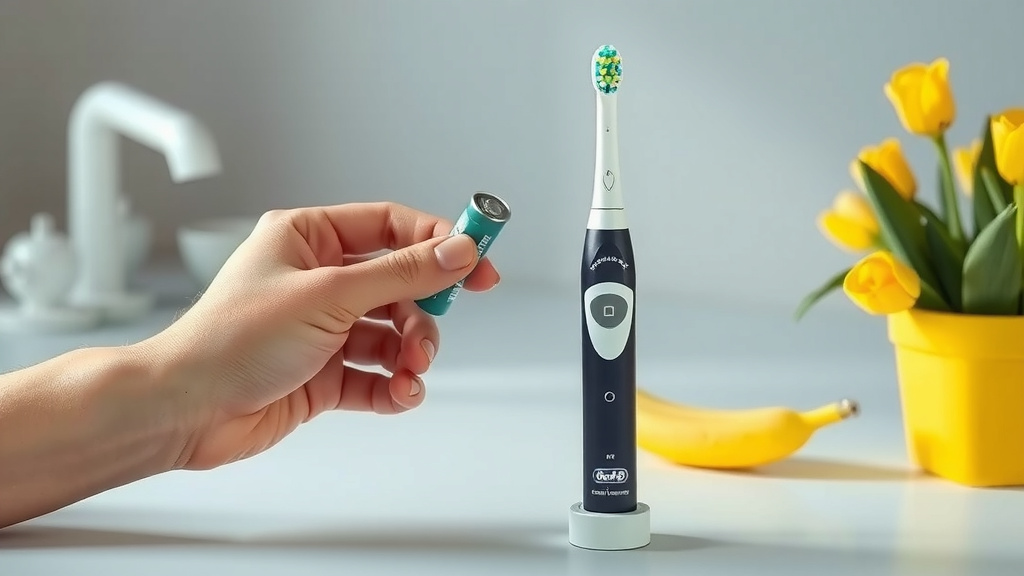
This is arguably the most important step. Batteries have a positive (+) and a negative (-) end. You must insert them correctly. Look inside the battery compartment; there’s usually a small diagram showing which way the batteries should face. Typically, the positive (+) end of the battery goes towards the spring or the top of the compartment, and the negative (-) end goes towards the cap or the bottom.
Why Polarity Matters
Putting the batteries in backwards will prevent your toothbrush from working. It’s like trying to plug a USB drive in the wrong way – it just doesn’t fit and won’t connect. The diagram is your best friend here. If there’s no diagram, most devices follow the convention of positive-to-spring.
Placing the Batteries
Carefully slide the AA batteries into the compartment, making sure the ends are oriented according to the polarity guide. Ensure they sit snugly. You should be able to fit two AA batteries side-by-side or end-to-end, depending on the design of your specific Oral-B model.
Securing the Battery Compartment
Now that the new batteries are in place, it’s time to close everything up. This step ensures the compartment is watertight and secure.
Reattaching the Bottom Cap
Take the bottom cap you removed earlier. Align it with the base of the toothbrush handle. You’ll need to twist it clockwise this time, the opposite direction from when you opened it. You should feel it engage with the threads on the handle.
Ensuring a Secure Fit
Continue twisting clockwise until the cap is firmly tightened. Many Oral-B models have a click mechanism or a point where the cap stops turning, indicating it’s properly secured. You want it to be snug to prevent water from getting into the battery compartment. A loose cap could lead to damage or malfunction down the line. It should feel secure and flush with the rest of the handle.
Here’s a quick checklist to make sure you’ve got it right:
- Bottom cap twisted off counter-clockwise? Check.
- Two AA batteries inserted correctly (pay attention to +/-)? Check.
- Bottom cap twisted back on clockwise until snug? Check.
- Toothbrush handle feels secure and ready to go? Check.
Testing Your Toothbrush
Once the batteries are replaced and the compartment is sealed, it’s time for the moment of truth! Press the power button on your Oral-B toothbrush. If the batteries are inserted correctly and are fresh, the toothbrush should power on immediately. You might hear the motor start up, and the brush head should begin vibrating. If it doesn’t turn on, don’t panic! Double-check that you followed all the steps, especially the battery polarity and ensuring the cap is securely fastened.
Model Variations and Tips
While the general process is the same for most Oral-B battery-powered models, there can be minor differences. For example, some older models might have a slightly different cap design, or perhaps a different battery type, though AA is overwhelmingly standard. Always refer to your specific model’s manual if you have it handy.
If your toothbrush has been exposed to a lot of moisture or toothpaste residue, take a moment to wipe down the inside of the battery compartment with a dry cloth before inserting new batteries. This can help ensure good electrical contact. Remember to replace batteries when you notice a drop in power, not just when the toothbrush stops working entirely. This ensures you always get the best cleaning performance.
Conclusion
You’ve successfully learned how to replace the batteries in your Oral-B electric toothbrush. Remember, it’s as simple as twisting the base counter-clockwise, inserting two AA batteries with the correct polarity, and twisting it back on until it clicks securely. Keeping fresh batteries in your toothbrush ensures you always get that powerful clean you expect. Don’t wait until your toothbrush completely dies; replace the batteries when you notice a power dip. Now you’re all set for a consistently bright and healthy smile!
Frequently Asked Questions
How do I know if my Oral-B is battery-powered and not rechargeable?
Most battery-powered Oral-B models have a removable bottom cap where the batteries go. Rechargeable models will have a charging port at the base or come with a specific charging stand and will not have a twist-off battery compartment.
Can I use rechargeable AA batteries in my Oral-B toothbrush?
Yes, you can generally use rechargeable AA batteries. However, their voltage might be slightly lower than standard alkaline batteries, which could result in slightly less power or a shorter lifespan per charge compared to new alkaline batteries.
What should I do if the bottom cap of my Oral-B is difficult to twist off?
If the cap is stuck, try using a dry dish towel or rubber glove for a better grip. Gentle wiggling while turning counter-clockwise can also help. Avoid using excessive force, which could damage the toothbrush.
My Oral-B still doesn’t turn on after changing the batteries. What’s wrong?
Double-check that you inserted the batteries with the correct positive (+) and negative (-) orientation according to the diagram inside the compartment. Also, ensure the bottom cap is twisted on tightly and securely, as a loose connection can prevent it from working.
How often should I replace the batteries in my Oral-B electric toothbrush?
This depends on usage and battery quality, but typically you’ll notice a decrease in power every 1-3 months. It’s best to replace them when performance dips, rather than waiting for the toothbrush to stop working entirely, to maintain optimal cleaning effectiveness.
![7 Best Electric Toothbrush For Family [2026]](https://bestbrushcleaner.com/wp-content/uploads/2026/08/7-best-electric-toothbrush-for-family-2026-featured-768x432.jpg)

![7 Best Electric Toothbrush Inexpensive [2026]](https://bestbrushcleaner.com/wp-content/uploads/2026/06/7-best-electric-toothbrush-inexpensive-2026-featured-768x432.jpg)