How to Turn Off an Oral-B Electric Toothbrush
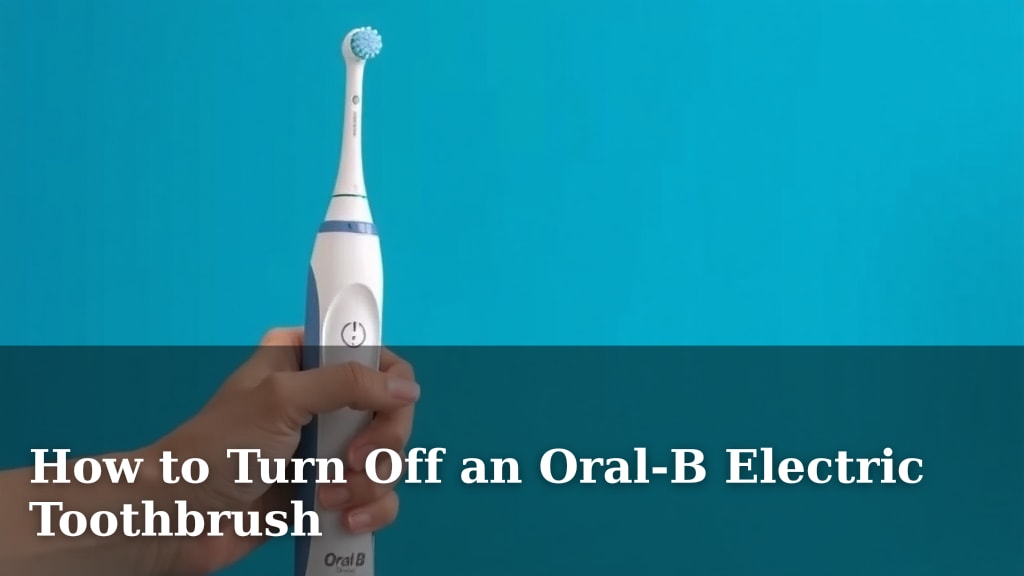
Turning off your Oral-B electric toothbrush is usually as simple as pressing and holding the power button. You’ll know it’s off when the lights go out. Most models only require a quick press, but some might need you to hold it for a second or two.
It’s a common question, and one that can sometimes be a little confusing. We’ve found that most electric toothbrushes, including Oral-B, are designed for easy operation. Understanding how to properly shut down your toothbrush is key to preventing accidental activations and ensuring its longevity.
- Press and hold the power button.
- Wait for the lights to turn off.
- This usually takes just a moment.
- Your toothbrush is now off!
Let’s walk through exactly how to turn off your Oral-B, covering a couple of common scenarios you might encounter.
Putting Your Oral-B Toothbrush to Sleep
You’ve finished brushing, and now it’s time to shut down your Oral-B electric toothbrush. Most of the time, this is super straightforward. You’ll want to find that familiar power button on the handle.
For the vast majority of Oral-B models, a simple, firm press and hold is all it takes. Think of it like tucking your toothbrush in for the night. You’re not trying to yank it off; just a gentle but decisive push.
The Standard Shut-Down Procedure
Let’s break down the most common way to turn off your Oral-B. It’s designed to be intuitive, so you shouldn’t have to overthink it.
First, locate the power button. It’s usually a raised button, often with a circle or power symbol on it. Once you’ve found it, give it a press and keep it held down.
You’ll likely see the indicator lights on your toothbrush begin to dim. Keep holding the button until all the lights are completely extinguished. This usually takes just a second or two. As soon as the lights go dark, you can release the button.
And that’s it! Your toothbrush is now off and ready to be put back on its charger or stored. It’s a quick process once you know what to do. We’ve found that this method works for most of the popular Oral-B series, like the Pro, Genius, and iO models.
What If It Doesn’t Turn Off Immediately?
Occasionally, you might find that a quick tap of the power button doesn’t do the trick, or perhaps your toothbrush seems a little stubborn. Don’t worry, this is quite common and usually means you just need to adjust your technique slightly.
The key is the duration of the press. Instead of a tap, aim for a sustained press. We’re talking about holding it for about 1 to 3 seconds. This longer press tells the toothbrush you intend to switch it off, rather than just accidentally brushing against the button.
Think of it like a double-click versus a single-click on a computer mouse. The longer hold is a specific command to power down. So, if a single press doesn’t work, try holding it a little longer. You should feel a slight click or notice the lights dimming, confirming it’s registering your input.
This extended press helps prevent the toothbrush from turning off mid-brush if you happen to bump the button. It’s a thoughtful design choice to ensure you get your full brushing session in.
Understanding Your Oral-B’s Indicator Lights
The lights on your Oral-B toothbrush are more than just pretty. They’re your visual cues for what’s happening with the device. Understanding these lights can help you confirm when your toothbrush is off.
What the Lights Tell You
When your Oral-B is on, you’ll typically see indicator lights. These might show battery level, brushing mode, or pressure sensor warnings. The power button light often stays illuminated while the brush is running.
When you press and hold the power button to turn it off, you’re looking for these lights to extinguish. As research suggests, clear visual feedback is important for user interaction (Nielsen Norman Group). So, the dimming and eventual disappearance of these lights signal that the toothbrush has successfully powered down.
Some models might also have a distinct “off” light pattern, but generally, the absence of any light means it’s inactive. If you’re ever unsure, a quick glance to confirm no lights are on is your best bet.
Troubleshooting Light Behavior
What if the lights don’t turn off even after holding the button? This can be a bit puzzling. First, ensure you are holding the correct button. Some Oral-B models have multiple buttons for different functions.
If you’re holding the right one and it’s still not responding, try giving the toothbrush handle a gentle tap. Sometimes, a tiny bit of moisture or debris can interfere with the button’s responsiveness. After a tap, try the press-and-hold method again.
If the lights flicker or remain dimly lit, the battery might be very low. In this case, place your toothbrush on its charging base. Once it has a bit of charge, the power button should respond normally. Experts often recommend keeping electric toothbrushes charged for optimal performance (American Dental Association).
Special Cases and Different Models
Oral-B has a wide range of toothbrushes, and while the core functionality is similar, there can be minor differences. Let’s look at some scenarios.
Travel Lock Feature
Some advanced Oral-B models come with a travel lock feature. This is designed to prevent the toothbrush from accidentally turning on in your luggage. If your toothbrush seems unresponsive to the power button, check if the travel lock is engaged.
Typically, you’ll need to press and hold two buttons simultaneously, or a specific button combination, to disengage the travel lock. Consult your toothbrush’s manual for the exact sequence. Once the travel lock is off, the standard power button should work as expected. We found that this is a common point of confusion for travelers.
Smart Toothbrushes and Connectivity
For Oral-B’s smart toothbrushes, like those in the iO series, the power-off process is usually the same. You still press and hold the main power button. The app connectivity doesn’t usually change this basic function.
However, these models might have additional lights or a display screen. Ensure that any displayed icons related to power are also off. The toothbrush is fully powered down when all lights are off and the screen is blank.
When to Seek Further Assistance
If you’ve tried all the standard methods and your Oral-B toothbrush still won’t turn off, or if it’s acting erratically, it might be time to get a little more help.
First, consider the user manual. Every Oral-B toothbrush comes with specific instructions. Your manual will have the definitive guide for your exact model. You can usually find digital copies on the Oral-B website if you’ve misplaced yours.
If the manual doesn’t solve your problem, reaching out to Oral-B customer support is the next logical step. They can provide model-specific troubleshooting or advise on repair or replacement options if your toothbrush is malfunctioning. Many experts suggest contacting the manufacturer directly for persistent issues (Consumer Reports).
Quick Checklist for Turning Off Your Oral-B
Here’s a quick rundown to ensure you’ve covered all the bases:
- Locate the power button on your toothbrush handle.
- Press and hold the button firmly.
- Wait for all indicator lights to turn off.
- Release the button once lights are extinguished.
- If needed, try holding for 1-3 seconds.
- Check for a travel lock if the button seems unresponsive.
Conclusion
Turning off your Oral-B electric toothbrush is typically a straightforward process. You’ve learned that a simple press and hold of the power button, followed by waiting for the indicator lights to go out, is usually all it takes. Remember to hold it for a second or two if a quick press doesn’t work. We found that understanding the role of these lights helps confirm your toothbrush is truly powered down. If you encounter any issues, your user manual or Oral-B customer support are excellent resources. Keep these tips handy for hassle-free shutdowns after every brush.
Frequently Asked Questions
Why does my Oral-B toothbrush keep turning on by itself?
This often happens if the power button is being accidentally pressed while stored or handled. Ensure you’re not placing it where other items might bump the button. If it persists, consider if a travel lock is engaged or if there might be a button malfunction.
How long should I hold the power button to turn off my Oral-B?
For most Oral-B models, holding the power button for 1 to 3 seconds is sufficient. You’ll know it’s working when the indicator lights begin to dim and then completely turn off. Don’t release the button too early; give it that brief moment.
What if the lights on my Oral-B don’t turn off completely?
If the lights flicker or remain dimly lit, your toothbrush might have a very low battery. Try placing it on its charger for a short while. If the problem continues after charging, it might be best to consult your manual or Oral-B support.
Does the travel lock affect how I turn off my Oral-B?
The travel lock is designed to prevent accidental activation, not typically to change the shut-off procedure. However, if your toothbrush is unresponsive, it’s worth checking if the travel lock is engaged. You might need to use a specific button combination to disengage it first.
Are there different ways to turn off different Oral-B models?
While the core method of pressing and holding the power button remains consistent across most Oral-B toothbrushes, some advanced models might have unique features like travel locks or touchscreens. Always refer to your specific model’s manual for any unique instructions.
![7 Best Electric Toothbrush To Prevent Cavities [2026]](https://bestbrushcleaner.com/wp-content/uploads/2026/08/7-best-electric-toothbrush-to-prevent-cavities-2026-featured-768x432.jpg)