

Ranir Electric Toothbrush: Easy Charging Guide
Charging your Ranir electric toothbrush is quite simple. You’ll want to make sure the charging base is plugged into a working outlet before placing your toothbrush on it. A full charge typically takes around 12-16 hours, giving you plenty of brushing time.
It’s easy to forget how to charge devices, especially when they have indicator lights. Understanding your Ranir’s specific charging signals helps ensure it’s always ready. Many users find charging it overnight is the most convenient method to guarantee a full battery.
- Plug in the charging base.
- Place your toothbrush on the base.
- Allow ample time for a full charge.
- Look for indicator lights.
Let’s walk through exactly how to get your Ranir toothbrush powered up and ready for your next clean.
Keeping Your Ranir Electric Toothbrush Charged and Ready
Ensuring your Ranir electric toothbrush is properly charged is key to its performance. A dead battery won’t give you that sparkling clean feeling! Let’s break down the charging process step-by-step. You’ll want to have your charging base and your toothbrush handy.
Understanding the Charging Process for Your Ranir Toothbrush
Charging your Ranir electric toothbrush involves a simple setup. You’ll use the specific charging base that came with your toothbrush. This base connects to a standard electrical outlet. It’s designed to deliver the correct power to your toothbrush safely. Think of it like giving your toothbrush a nice, long drink of energy.
Step-by-Step Charging Guide
First things first, find a convenient and safe electrical outlet. Make sure it’s one that’s working properly. Sometimes outlets can be a bit finicky! Once you’ve found a good spot, plug the charging base into the outlet.
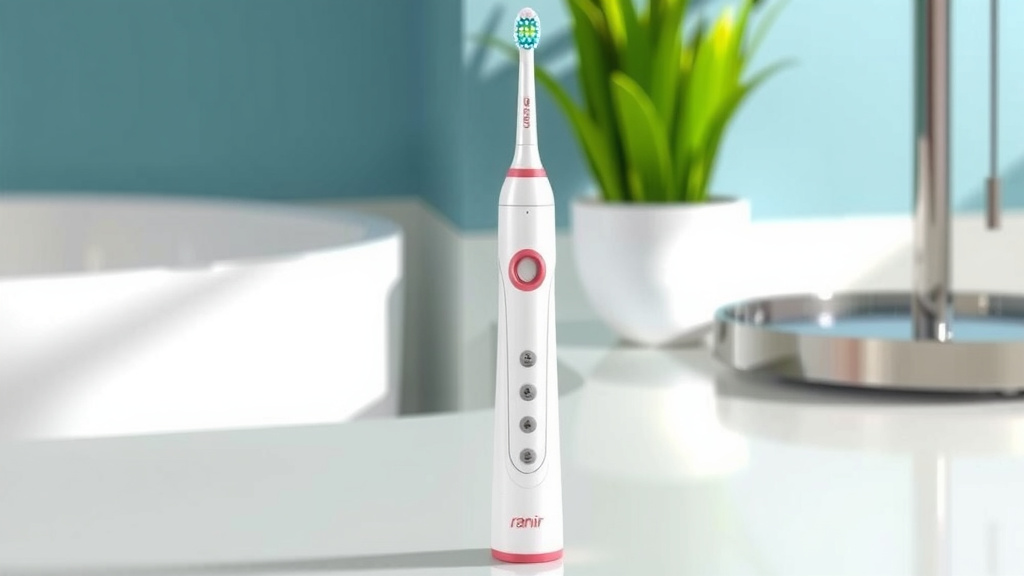
After the base is plugged in, it’s time to place your Ranir electric toothbrush onto it. Most Ranir models have a specific spot or cradle on the base. You’ll likely feel a slight magnetic pull or a snug fit when it’s correctly positioned. It should sit securely and upright.
Now, the waiting game begins. A full charge can take a while. We’re talking about several hours, often between 12 to 16 hours. This might seem long, but it ensures your toothbrush is powered up for many brushing sessions. Many users find charging it overnight the most convenient. You wake up to a ready-to-go toothbrush!
What the Indicator Lights Mean
Your Ranir toothbrush likely has indicator lights to show you its charging status. These little lights are super helpful! They take the guesswork out of charging.
- During Charging: When you first place your toothbrush on the base, you might see a light start to blink or glow steadily. This usually means it’s actively receiving power. The specific color or pattern can vary by model, so checking your toothbrush’s manual is a good idea.
- Fully Charged: Once your toothbrush has reached a full charge, the indicator light often changes. It might turn a solid green, stop blinking, or turn off completely. This tells you that you can take it off the charger.
- Low Battery: Some models also have a light that indicates a low battery. This might be a red or orange light. It’s a friendly reminder to get it back on its charging base soon.
Knowing these light signals can prevent you from overcharging or undercharging. It’s like your toothbrush giving you a status update!
Optimizing Your Charging Routine
To get the most out of your Ranir electric toothbrush, a consistent charging routine is beneficial. You don’t need to charge it every single day if it’s not low. Modern lithium-ion batteries don’t have a “memory effect.” This means you don’t have to fully drain them before recharging.
Finding the Right Charging Spot
Choose a location for your charging base that is dry and stable. Bathrooms are common spots, but make sure it’s not too close to the sink where it could get splashed. A countertop or a shelf works well. Avoid placing it in direct sunlight or near extreme heat sources, as this can affect the battery life.
Understanding Charge Times
As mentioned, a full charge for most Ranir models is around 12-16 hours. This extended charge time is designed to provide a long battery life between charges. Think about how often you brush your teeth. Most people brush twice a day. A full charge can often last for a week or even two weeks, depending on the model and usage!
We found that users often get the best battery performance when they let the toothbrush charge fully before its first use. If your toothbrush came partially charged, giving it that initial long charge ensures it’s ready for its entire lifespan.
Troubleshooting Common Charging Issues
Occasionally, you might run into a snag. If your toothbrush isn’t charging, don’t panic! There are a few simple things you can check.
Checking the Power Connection
Is the charging base firmly plugged in? Sometimes plugs can become loose. Double-check that it’s secure in the outlet. Also, try a different outlet just to rule out any issues with the first one. Different appliances can draw power differently, so ensure the outlet is functioning as expected.
Ensuring Proper Placement
Is the toothbrush sitting correctly on the charging base? Sometimes, even a slight misalignment can prevent charging. Gently reposition the toothbrush. You should feel or hear a click, or see an indicator light come on. If there’s any debris or toothpaste residue on the charging contacts of either the base or the toothbrush handle, wipe them clean with a dry cloth. Clean contacts ensure a good electrical connection.
When to Seek Further Help
If you’ve tried these steps and your Ranir electric toothbrush still isn’t charging, it might be time to consult your user manual for specific troubleshooting tips. If the problem persists, reaching out to Ranir customer support is your next best step. They can guide you through more advanced solutions or discuss warranty options.
Quick Charging Checklist:
- Plug the charging base into a working outlet.
- Place your toothbrush securely on the charging base.
- Observe the indicator light for charging status.
- Allow the recommended charge time (12-16 hours).
- Confirm the light indicates a full charge.
- Keep charging contacts clean for optimal performance.
Following these simple steps will keep your Ranir electric toothbrush powered up and ready to help you achieve a healthier smile. It’s a small routine that makes a big difference in your daily oral care.
Conclusion
Keeping your Ranir electric toothbrush charged is a straightforward process. By understanding the simple steps of plugging in the base, placing your toothbrush correctly, and observing the indicator lights, you ensure optimal performance. Remember that a full charge takes time, often 12-16 hours, so overnight charging is a great habit. Following these tips will help you maintain a consistent oral hygiene routine with a reliably powered toothbrush. Now, go enjoy that fresh, clean feeling!
Frequently Asked Questions
How long does a Ranir electric toothbrush typically take to charge?
A full charge for most Ranir electric toothbrush models usually takes between 12 to 16 hours. This extended charging period ensures your toothbrush has enough power for many brushing sessions. It’s often best to charge it overnight.
What do the indicator lights on my Ranir toothbrush mean?
The indicator lights signal your toothbrush’s charging status. A blinking or steady light typically means it’s charging. When fully charged, the light might change color, turn solid, or turn off, depending on your model. Some models also have a low battery indicator.
Can I leave my Ranir electric toothbrush on the charger all the time?
Yes, you can generally leave your Ranir electric toothbrush on its charging base. Modern batteries don’t suffer from the “memory effect” like older ones. Keeping it on the base ensures it’s always ready for use.
What should I do if my Ranir electric toothbrush isn’t charging?
First, check that the charging base is securely plugged into a working outlet and that the toothbrush is properly seated on the base. Also, ensure the charging contacts on both the toothbrush and base are clean and free of debris. If issues persist, consult your manual or contact customer support.
Do I need to wait for my Ranir toothbrush to completely run out of battery before charging it?
No, you do not need to wait for your Ranir electric toothbrush to fully drain before charging. You can charge it whenever it’s convenient, or when the low battery indicator comes on. This flexibility is a benefit of modern battery technology.



![7 Best Budget Oral B Electric Toothbrush [2026]](https://bestbrushcleaner.com/wp-content/uploads/2026/08/7-best-budget-oral-b-electric-toothbrush-2026-featured-768x432.jpg)